Dated guest-entry records
These rows separate successful entry, a failed reconnect, and what the game showed after entry. Use the deepest completed step to compare a new attempt.
| Observation | Setup and result | Evidence and boundary |
|---|---|---|
| WebWoW · Nov 3, 2026 | Desktop Chrome on macOS, keyboard and mouse. Guest reached the world and the Shadow Compact controls were inspected. | Control observations. Build label, browser build, queue and timings were not recorded for this run. |
| Arena of Champions · Nov 3, 2026 | Desktop Chrome on macOS, keyboard and mouse. Guest reached town; Warrior showed Arms and Fury and five talent rows. | Dated recording and transcript. The separately collected client reference is 0.28.1. No complete match. |
| Arena of Champions reconnect · Nov 3, 2026 | One normal reconnect attempt after a server connection message. The guest session still showed disconnected. | No new town or practice result. One reconnect cannot establish a general outage or its cause. |
Which route to try first: use the WebWoW notes if you want to inspect an in-world control layout. Use the AoC recording and local talent planner if you want to prepare a loadout. Neither run measures which game queues faster.
Browser results on the same device
Two local feature runs were recorded on Mac14,7 with macOS 15.5, on November 3, 2026. Both used the development version of this site’s tool over loopback, with no external game requests during the probe.
| Browser | Secure context | WebAssembly sample | WebGL 2 readback |
|---|---|---|---|
| Chrome 156.0.8078.80 | Available | Passed | RGBA 255, 0, 0, 255 |
| Safari 18.5 (20621.2.5.11.8) | Available | Passed | RGBA 255, 0, 0, 255 |
| Firefox and Edge | No recorded run in this matrix. | ||
Download the original browser results as CSV. These browser versions belong to the recorded tool runs. The earlier game captures did not record exact browser builds.
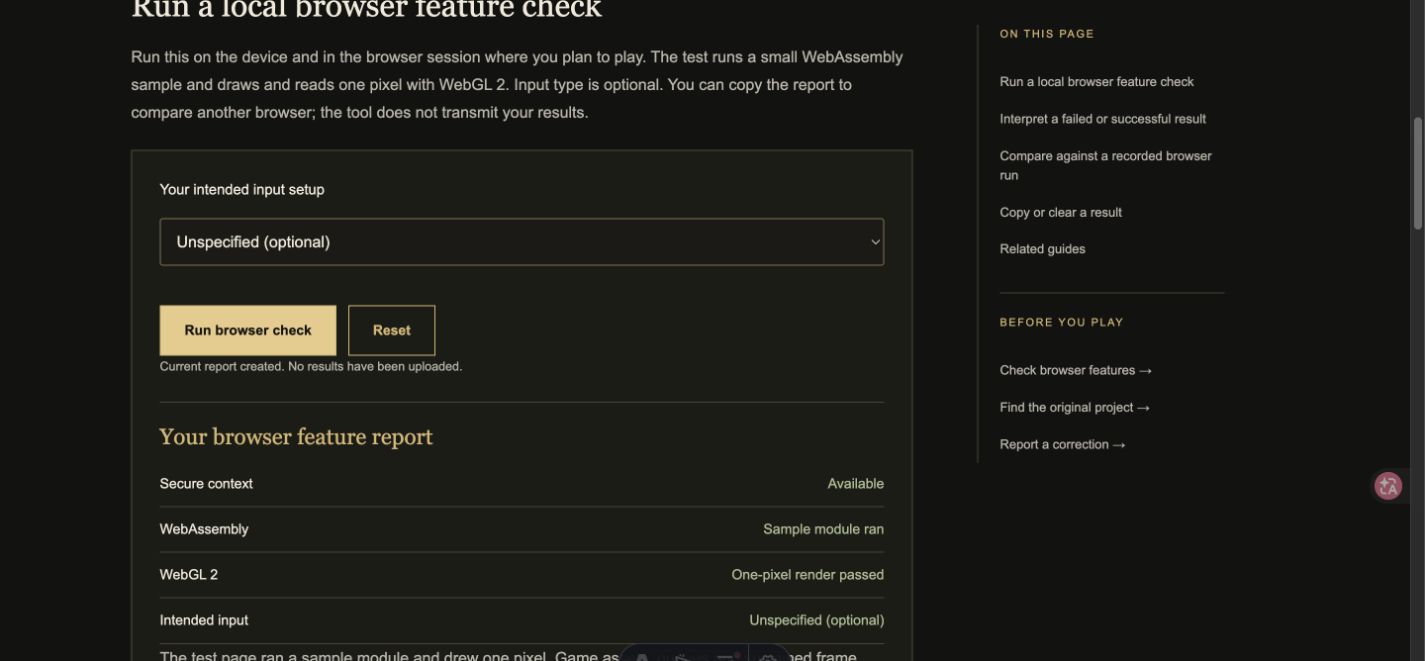
Reproduce a test
- Record device, OS and exact browser version. Note whether this is a physical device, a remote session or responsive emulation.
- Open the local browser check over HTTPS. Run the sample, then copy the result. Repeat in the comparison browser on the same device. One-pixel readback and an empty module are feature checks only.
- For a game run, start a new visit and note network conditions, cache state, input and guest or registered route. Record navigation-to-entry-screen and guest-click-to-controllable-character separately. Time queue entry to match start only if the queue is actually joined. Mark censored runs by their last visible step and elapsed observation period.
- For a comparison claim, use the same hardware, network and cache conditions and repeat each route at least three times. Report individual values, the median and any timeout. Measure sustained frame rate and memory only with a documented capture window and instrument. A phone-sized viewport is a layout test.
Remove chat, identifiers and account details from shared evidence. For an incorrect entry, send the date, project, URL and corrected observation through the correction process.
How to use the two browser results
Both local browser runs used the same Mac and probe. Both compiled the sample and read the same four bytes from the framebuffer. That is enough to say the test did not expose a feature difference in those two sessions. It is insufficient for a game recommendation between the browsers. The guest observations came from Chrome and ended before a measured queue or completed match. Safari’s feature pass adds a browser datapoint without adding a Safari game session.
If a second tester sees different bytes or a missing context, we can reproduce the difference by asking for the tool URL, exact browser version and whether the session is remote. If a tester sees matching bytes but cannot enter a game, the next record should report the last game screen, not repeat the pixel probe as a proxy for game availability.
Log the first usable screen and queue separately
Use the navigation start as the first timestamp. Record when the entry controls accept input, then record guest submission and first movement in town or the world. These are different outcomes: an entry form can be ready before the game server accepts a character. A queue trial starts only when the client confirms that it accepted a queue request. A disconnected attempt can be useful if its visible stage and observation window are recorded.
For a slow first visit, record whether it was an uncached load. For a repeated visit, record whether the browser could reuse its files. Keep both results instead of averaging unlike visits. Compare window size and input setup when a test includes frame rate. Measure the same segment of the same map to compare two devices. The current dataset has neither a comparable timing series nor a completed match.
For the November 3 AoC recording, the capture was already in town and the edited clip lasts about 24 seconds. Its length is the duration of the walkthrough. The video does not show the elapsed time from navigation or from guest submission. Use the transcript to verify the menu steps it actually includes.