THE BROWSER ARENA FIELD GUIDE

WoW Arena Browser:
Find your game.

Find the original browser PvP projects, compare the menus we checked, and prepare your first session with practical guides and local tools.

Independent guides for WebWoW and Arena of Champions.
This guide does not provide an official World of Warcraft client.

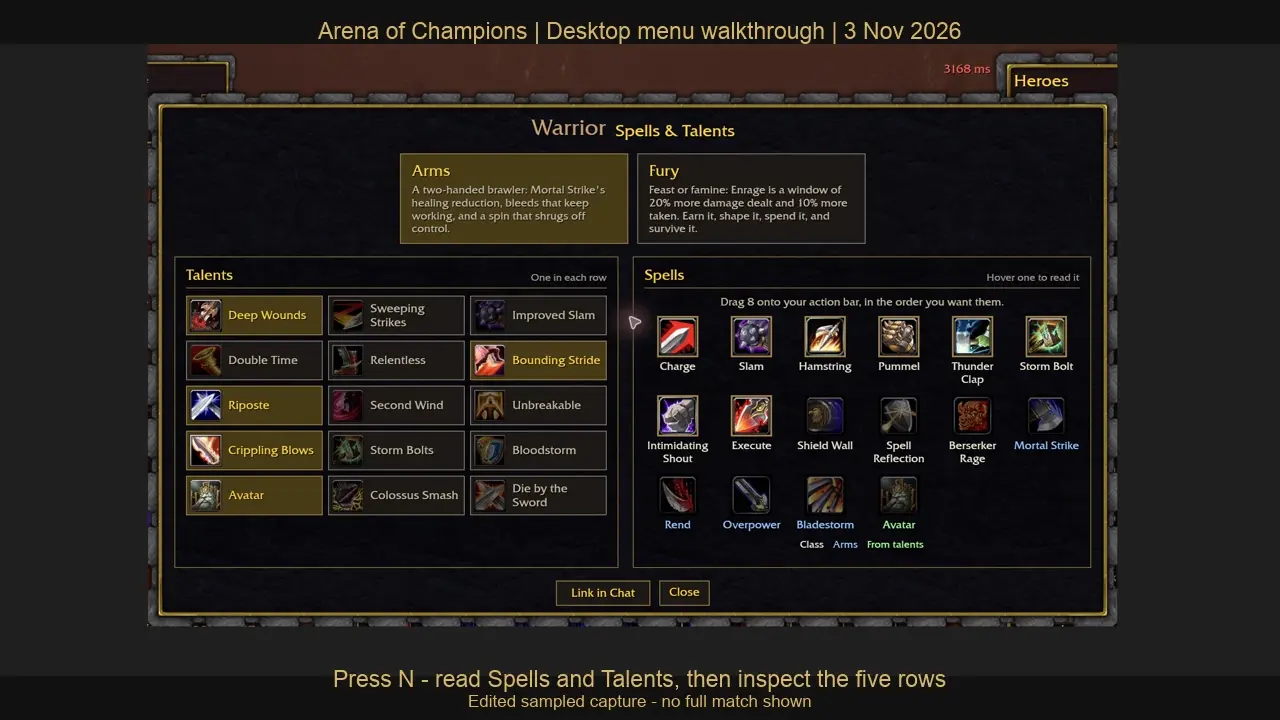
Our Arena of Champions guest session showing the actual Warrior Spells and Talents menu
OUR NOVEMBER 3 GUEST SESSION · WATCH THE MENU WALKTHROUGH
Original project links

Know which game you are opening.

Browser-first guidance

Controls, accounts and device limits.

Independent & transparent

Sources and test limitations included.

01 / CHOOSE YOUR NEXT ARENA

Your WoW arena browser
starting points.

Compare WebWoW and Arena of Champions by their original domains, current class menus and guest-entry results. They are separate projects.

Original arena illustration for the WebWoW guide
Duels · arena · Warsong

WebWoW

A browser PvP simulator whose current entry screen offers ten classes. Start with the project’s guest option and read the current queue prompts.

Guest world entry verified

November 3: guest world entry and the current Shadow Priest action bar were rechecked. Read the dated entry and control record.

Original arena illustration for the Arena of Champions guide
Independent arena PvP

Arena of Champions

A separate browser arena project with guest entry and an optional Windows client on its login screen.

Guest lobby verified

November 3: a guest entered the town lobby and opened the Warrior talent menu. The current source snapshot has nine classes and 23 specializations. Watch the actual menu walkthrough.

Latest desktop checks, November 3, 2026: WebWoW guest world entry and AoC guest town entry succeeded. Watch the AoC menu or read the dated comparison records.

02 / BEFORE THE GATES OPEN

A clearer path
to your first session.

Browser arena projects bring a focused PvP idea into a browser tab. You still need to identify the right game, understand its account prompts and learn its own controls.

Our recorded setup used desktop Chrome on macOS with keyboard and mouse. The device evidence matrix separates that result from physical-phone testing.

Check common browser features →
  1. Find the original project

    Use a named game and a checked destination. Similar class names do not make two games the same service.

  2. Read the current entry prompts

    Guest access, saving progress and queue eligibility can differ. Read the live screen before depending on a temporary session.

  3. Learn one thing at a time

    Find movement, targeting and one useful defensive action. Read the current controls before following an old build.

03 / KNOW WHAT YOU ARE PLAYING

Familiar world.
Independent games.

How we check our guides →
PROJECT IDENTITY

Arena games, not official WoW.

These are separate community projects. They do not connect you to an official Blizzard character, subscription or account.

YOUR ACCOUNT

Guest does not mean permanent.

A guest button offers an entry route. It does not establish long-term saving, recovery or access to every rated mode.

YOUR DEVICE

Loading is only the first step.

A graphics feature can be available while a server is busy or input remains unsuitable. Check the stage that actually failed.

04 / GET YOUR BEARINGS

Choose a role.
Then learn the buttons.

WebWoW’s entry screen lists ten familiar classes, including Death Knight. The November 2 Arena Journal describes thirty specializations. That helps you recognize a playstyle, but it does not establish the same talents or balance as official WoW.

Think first about what you want to practise: staying in melee range, keeping a target at distance, healing an ally, or finding a safe moment to act. Then read the selected character’s current abilities.

Start with a short practice plan

Before a competitive queue, identify how your character moves and chooses a target. Read one main action, one defensive option and any interruption or escape the current class actually provides.

If the client offers a practice mode, use it to confirm those actions. After a session, pick one decision to improve instead of replacing your entire plan after every loss.

We have not published a class tier list or copied official WoW builds into these browser clients. Those pages need current, game-specific evidence.

Follow the preparation checklist →
05 / PICK YOUR NEXT STEP

What have you reached so far?

Use the screen in front of you to decide what to do next. A guide can explain a step without promising a working game server.

If you can see…Try this nextUseful guide
A search result or video, but no clear game nameCompare the named projects and their original domains. Similar class names do not identify a shared account.Compare the game entry points
A loading screen before the entry formRead the exact message, then check common browser features. A feature result helps separate a local limitation from an unknown remote problem.Run the local feature check
A guest button followed by an errorRecord the response and time, then consult the original project. A new account or unofficial download is not a verified repair.Understand the guest error observation
A connected world with unfamiliar controlsOpen the client’s current control settings and learn targeting and one action before a competitive queue. Our WebWoW notes cover one observed Priest setup, not every character.Read the observed control notes

Observed November 3: WebWoW guest world entry and AoC guest town and Warrior menu. The AoC source snapshot includes patch 0.28.1, nine classes and 23 specs. Read each project's evidence record for its remaining test scope; publication dates and source dates are recorded separately.

SOURCE SNAPSHOT / 0.28.1

Inspect a class.
Prepare a real plan.

Use these references here on the guide before opening the game.

Plan five talent choices

Select one option per row and prepare a versioned link. Choices remain local and do not change a game account.

Read the changed rules

Follow the guest-entry fix, Arcane Mage release and dated balance changes back to the original client record.

PRACTICAL NEXT STEPS

Use the screen you have reached.

Browse practical guides →
CURRENT CONTROL LABELS

Check WebWoW keybinds

Read a dated Shadow Priest example, inspect the current template and build a short practice sheet.

LOADING AND CONNECTIONS

Find the failed stage

Separate page, graphics, guest-entry and queue symptoms with a local next-step selector.

The update journal explains the original November 2–3 WebWoW announcements and how they affect old build and control advice.

06 / QUICK ANSWERS

Before you jump in.

All frequently asked questions →
Which game am I looking for?

WebWoW and Arena of Champions are separate projects. Match the name and original destination to the game you saw. Read the full answer →

Is this an official Blizzard website?

No. Bella Choi publishes this independent guide; the original projects run their own services and accounts. Read the full answer →

Can I try guest access?

Both observed entry screens offered it. WebWoW reached a world, and a November 3 AoC guest reached the town lobby and Warrior talent menu. The older November 2 AoC guest error remains a dated observation, not the latest result. Read the full answer →

Can I use a phone?

The guide works on small screens. A complete touch-only game match has not been verified here. Read the full answer →

A SMALL CHECK. A BETTER START.

Is your browser ready?

Check common browser features locally. Understand the limits before opening a game.

Run the browser check ↗

Our original-project sources are WebWoW and Arena of Champions. We distinguish project claims from our own observations. Game rules, queues and availability can change after a check.

See an outdated instruction? Send a correction. Read our privacy policy for optional analytics and local tool handling.