Independent, unofficial guide. Not affiliated with or endorsed by Blizzard Entertainment, WebWoW or Arena of Champions. Project names identify the subjects covered.
Arena of Champions Warrior: begin with the observed menu
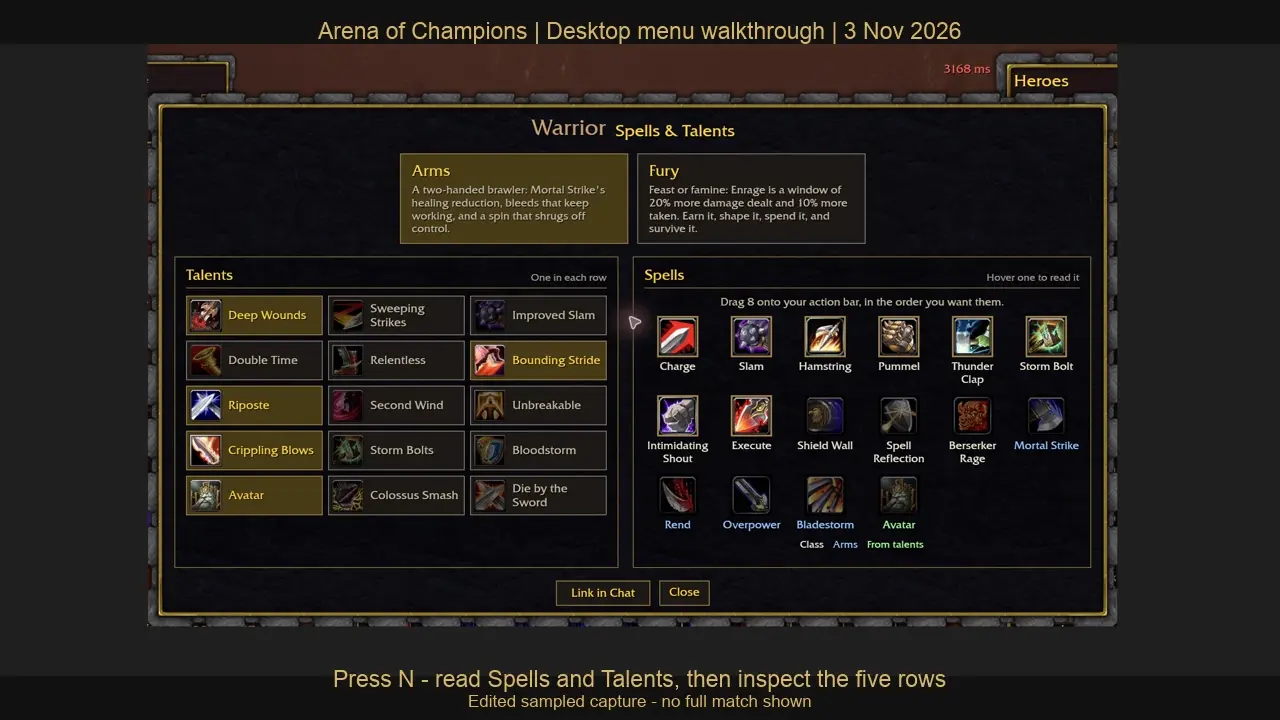
This Arena of Champions Warrior guide follows the actual desktop guest menu we inspected on November 3, 2026. That Warrior reached the town, and pressing N with the game focused opened Spells & Talents. Arms and Fury appeared as separate specialization choices. The short recorded walkthrough shows where those controls are and includes a text transcript.
Use this page to inspect a Warrior's available options and prepare a practice sheet before playing. The original 0.28.1 class snapshot defines base health 5,250 and Rage as the class resource, with a configured maximum of 100. Those are base client fields, not measured effective health or evidence that a particular talent setup survives a matchup.
First confirm that you opened arenaofchampions.live rather than WebWoW. Both projects have familiar class names, but their menus, spell definitions and accounts differ. This guide does not move a character from another game or apply a retail WoW talent import.
Inspect Arms and Fury before changing a build
- Focus the game canvas, then press N. If a browser control receives the key instead, click the game area and try the menu key again.
- Read the selected specialization label. The captured menu displayed Arms and Fury; it did not demonstrate a completed specialization change.
- Read the five rows on the left. The interface asks for one selection in each row.
- Read the spell area on the right. It separates the available spells from the eight slots you can place on the bar.
- Before altering your real setup, write down the current labels or keep a private screenshot. Hide chat and account identifiers if you later share an image.
Our clip is a low-frame-rate interface sequence. It is useful for locating labels; it is not a timing demonstration, an executed rotation or a recorded arena win. Use the current tooltip for a talent's effect and the current controls for executing it.
Arena of Champions Warrior talent options
Arms talent rows
| Row | Choose one of these options |
|---|---|
| 1 | Deep Wounds, Sweeping Strikes, Improved Slam |
| 2 | Double Time, Relentless, Bounding Stride |
| 3 | Riposte, Second Wind, Unbreakable |
| 4 | Crippling Blows, Storm Bolts, Bloodstorm |
| 5 | Avatar, Colossus Smash, Die by the Sword |
Fury talent rows
| Row | Choose one of these options |
|---|---|
| 1 | Furious Charge, Seething Rage, Endless Rage |
| 2 | Frenzy, Bloodcraze, Reckless Abandon |
| 3 | Raging Blow, Meat Cleaver, Crushing Blows |
| 4 | Die Hard, Unbridled Regeneration, Unyielding |
| 5 | Recklessness, Rampage, Battle Cry |
These thirty option names are transcribed from the two five-by-three Warrior trees in the inspected source. Open the Arena of Champions talent calculator to choose a specialization, select one per row and prepare a validated link. The planner preserves the version and does not claim to choose the strongest combination for you.
For example, picking Deep Wounds in Arms row one prevents also choosing Sweeping Strikes in that same row. A different row still needs its own choice. The rule controls the plan's structure; the names alone do not reveal the full effect or prove how much damage the combination produces.
Build an eight-slot inspection sheet
The visible Warrior spell area included Charge, Slam, Hamstring, Pummel, Thunder Clap, Storm Bolt, Intimidating Shout, Execute, Shield Wall, Spell Reflection and Berserker Rage, with specialization and talent-related additions alongside them. This is a set of available labels, not a declaration that all of them fit simultaneously on an eight-slot bar.
Make a small sheet with eight numbered slots. For each current slot, write the displayed spell label, the key you actually use, the intended target and any visible tooltip requirement. Leave unknown fields blank until you read them in the client. Do not replace the key column with a remembered WoW binding or count an unplaced spell as an accessible action.
Choose one simple task for the first practice attempt: locate a targeting control, find the defensive action currently on your bar or check which option grants an extra button. The useful result is whether you can identify and reach the intended control. Do not call this an optimal Warrior rotation without actual timing and combat evidence.
Check recent Warrior and shared-system changes
The original 0.27 update clarifies Fury's description of its Enrage damage-taken tradeoff and discusses effects that interact with walls. The 0.28 update changes movement behavior. Those source notes are relevant when an old clip seems to show different movement or when a description omits a tradeoff.
Read the dated Arena of Champions patch notes, then compare the current menu. A description correction and a newly measured combat effect are different forms of evidence. We have not played a complete Warrior match, measured a matchup win rate or ranked Arms against Fury.
Keep a useful practice record
Record the project, source date, specialization, five planned talents and your eight actual action-bar labels. Add the browser and input setup you used. Next, record the stage you actually reached: town, practice entry, queue or a completed match. A failed connection should be written as that outcome, rather than counted as a loss or silently discarded.
For a later combat record, add mode, map, opponent context, ending condition and the specific decision being tested. A frame-rate or latency figure needs a named display or measurement method; do not estimate it from this clip. A result from one setup cannot establish touch-only phone compatibility.
Primary sources are the original Arena of Champions client, its Warrior configuration and our November 3 menu observation. Report a changed label with the specialization, row and date. The class directory provides the separate roster reference.