Independent, unofficial guide. Not affiliated with or endorsed by Blizzard Entertainment, WebWoW or Arena of Champions. Project names identify the subjects covered.
Arena of Champions talent calculator: choose five rows
Version 0.28.1, November 3 snapshot. Choose a specialization, then one talent per row. This is a local selection planner; it does not calculate damage or send a build to the game.
Warrior — Arms
Choose five talents to prepare a link.
How to use the Arena of Champions talent calculator
This Arena of Champions talent calculator solves a specific preparation task: choose five valid talents, record the specialization and share the same selection with another reader. The current dataset contains all twenty-three specializations from the original 0.28.1 client snapshot, checked November 3, 2026. The initial Warrior Arms form is rendered directly in HTML. JavaScript adds specialization switching, validation and link preparation.
- Choose the class and specialization above. Changing it clears previous choices and invalidates an earlier prepared link.
- Choose one option in every row. Selecting another option in the same row replaces that row's previous choice.
- Press Prepare share link. An incomplete plan produces a readable message instead of a misleading valid build.
- Read the five-option summary, then copy the link. If automatic copying is unavailable, select the displayed link manually.
- Open the link in another tab to restore the class, specialization and five choices. Review them against the current game before using the plan.
Clear choices resets this page's form and prepared output. It does not recall links you already copied or shared elsewhere. The tool does not log into a game, alter a character or claim a game-supported import format.
Five rows, three options and a versioned plan
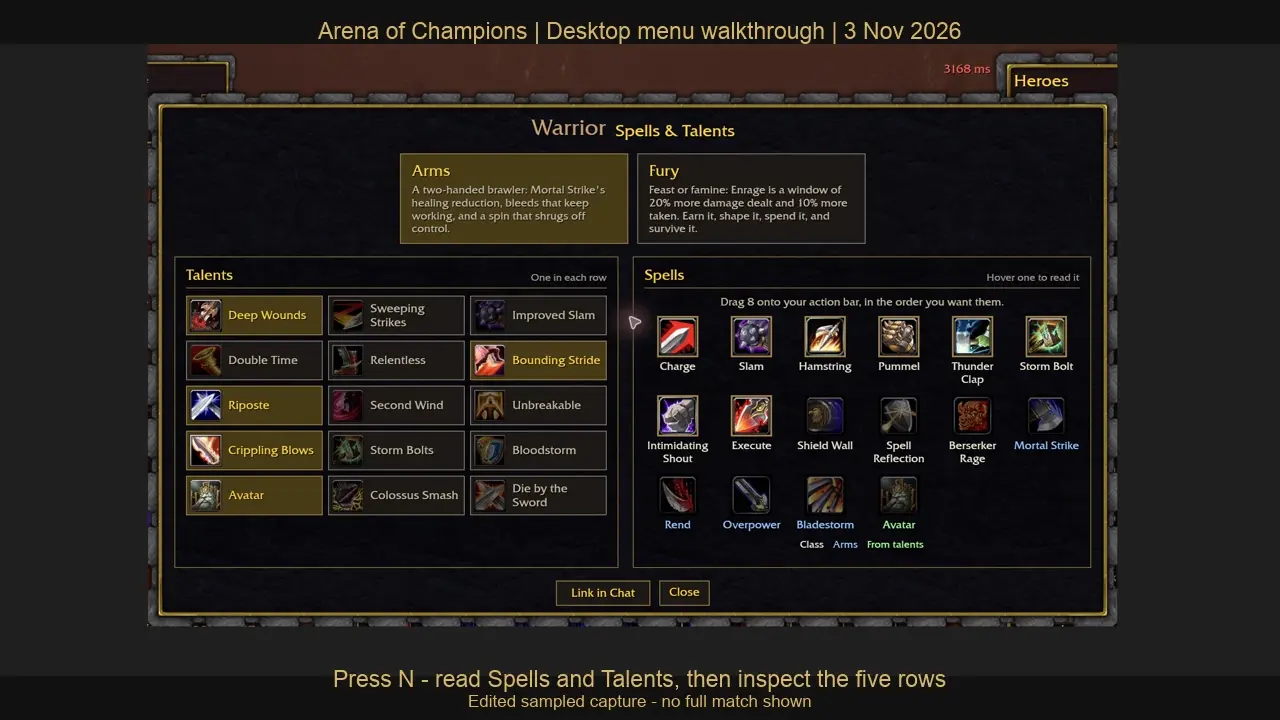
The recorded Warrior Spells & Talents interface says to select one option in each row. Separately, every specialization in the inspected configuration has five rows of three options. The planner applies that structure to its own selections. It allows five choices in total, one from each corresponding row, and validates the class/spec pair rather than accepting a specialization name in isolation.
For example, an Arms plan can select Deep Wounds in row one, Double Time in row two, Riposte in row three, Crippling Blows in row four and Avatar in row five. This is a validation example, not a recommended competitive build. Moving Avatar into row one is rejected even though Avatar is a real option elsewhere in the same specialization.
The link carries the data version. An old-version link is not silently reinterpreted as a current build, because a patch can rename, replace or move an option. Malformed links, repeated fields, unknown classes and choices from the wrong row produce a clear error and leave the form without imported choices. A class/spec link without talents simply opens the relevant blank form.
What the calculation does and what to read in the game
The result is a valid set of row selections for this snapshot. It is not a damage simulator, a healing estimate, a win-rate forecast or an optimal-build ranking. Talent names alone cannot establish range, cooldown, resource interactions or server behavior. We deliberately do not invent numerical effects or import values from official World of Warcraft.
After planning, open the original client's current menu and inspect each tooltip. Check whether a choice grants an action that must be placed on the eight-slot bar, modifies an existing spell or changes a passive behavior. The real menu remains the source for applying the plan. Our Warrior walkthrough provides an observed example of that inspection sequence.
When comparing two plans, change one row and explain the task you are preparing for, such as finding an action or checking a tooltip. Do not infer that a plan with more offensive-sounding names wins a matchup. Testing that claim would require a defined mode, opponents and an actual set of completed matches.
Data source and update checks
The option names and row positions come from the original Arena of Champions public client configuration, checked November 3, 2026. The dataset includes nine classes, twenty-three specializations and 345 talent options. Our patch notes guide explains recent changes relevant to stale builds.
The class directory helps identify the specialization before making a plan. For an incorrect option, report its class, specialization, row, current label and observation date through Contact. Do not include game credentials, private chat or account-recovery links in a correction.